Why use container solutions for data centers? The answer begins with practical pressure: rising equipment density, limited floor space, and demand for faster deployment. In field projects, a containerized module can arrive with racks, power distribution, cooling, fire detection, and monitoring already integrated. A prepared site may need only foundations, network links, and utility connections. That changes the construction timeline. It also reduces the number of separate installation decisions made under pressure.
This guide examines the top ten reasons organizations consider container solutions for data centers. It covers scalability, energy management, physical security, portability, and operational resilience. Engineers can compare air cooling, liquid cooling, backup power, and remote monitoring within one controlled structure. A mining site, hospital campus, or temporary recovery facility may gain value from this approach. The benefits are real, but they are not automatic. Transport limits, local weather, maintenance access, and future expansion can create difficult trade-offs. The case is not flawless. A poorly planned module may trap heat, complicate repairs, or cost more than a conventional room. Careful assessment matters. Reliable decisions should combine manufacturer specifications, site measurements, lifecycle costs, and lessons from experienced operators. This overview aims to provide that balanced foundation, while recognizing that every facility has different risks, workloads, and service expectations.
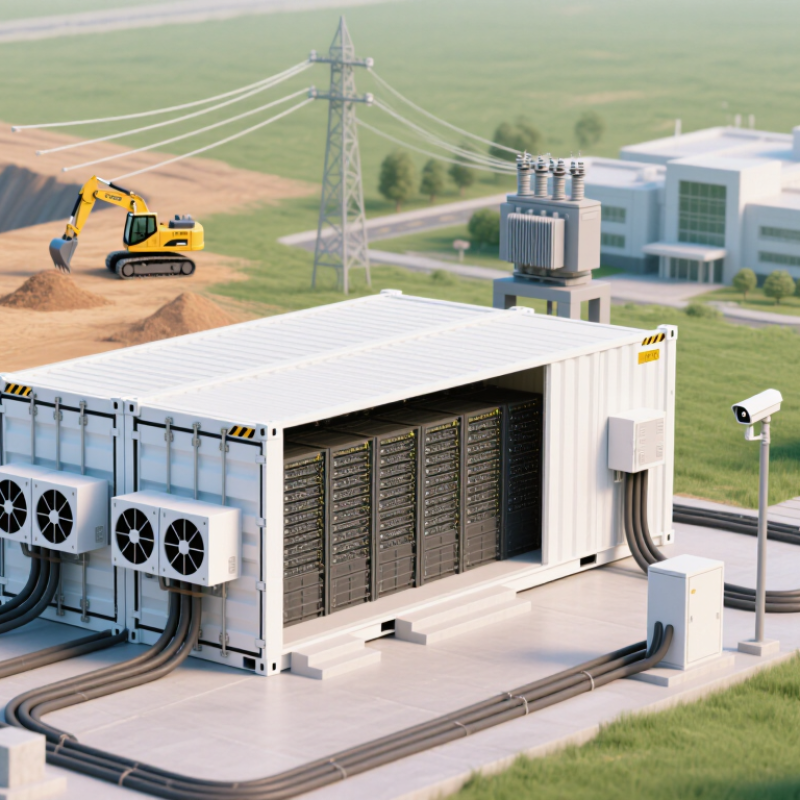
Container solutions are modular data-center environments built inside prefabricated units. They can hold servers, storage systems, networking equipment, power controls, and cooling devices. Some designs operate beside a traditional facility, while others support remote or temporary sites. The enclosure arrives largely assembled, reducing construction time and simplifying installation.
Inside the unit, sensors track temperature, humidity, power use, and airflow. Intelligent controls can adjust cooling when workloads change. Power distribution systems feed each rack, while backup batteries or generators support continuity during interruptions. Operators manage the environment through monitoring software and receive alerts about heat, faults, or unusual consumption. Physical access controls and fire detection add another security layer.
This approach helps organizations expand capacity without rebuilding an entire facility. A new module can support seasonal demand, edge computing, or disaster recovery workloads. Standardized layouts also make maintenance more predictable. Cooling performance can be strong because airflow paths are designed around a fixed rack arrangement. Still, the model is not flawless. Poor site preparation can delay deployment. Limited internal space may complicate repairs. A sealed unit can also become dangerously warm when cooling equipment fails. Experienced teams should assess local weather, network availability, fire requirements, and future power demand before installation. In practice, careful testing matters more than attractive specifications. A container can be efficient, but only when its design matches the workload, location, and operating discipline.
| No. | Reason | What the Container Solution Is and How It Works | Relevant Data Dimension | Practical, Industry-Based Data | Key Planning Consideration |
|---|---|---|---|---|---|
| 1 | Faster deployment Speed | A containerized data center packages IT racks, power distribution, cooling, fire protection, monitoring, and physical security inside a factory-assembled enclosure. The unit is transported to the site, connected to utilities, tested, and commissioned. | Deployment sequence and commissioning time | Factory assembly allows many installation tasks to occur in parallel. Site work is mainly related to foundations, electrical connections, network links, and final integration rather than full on-site construction. | Confirm transport routes, lifting requirements, local permits, and utility readiness before delivery. |
| 2 | Modular capacity growth Scalability | Capacity is added in blocks such as racks, power modules, cooling modules, or complete data-center containers. This supports a build-as-needed model instead of installing the entire projected capacity on day one. | Initial capacity, expansion block size, and utilization | Modular designs can reduce unused infrastructure during early operation because additional capacity is installed when workload demand increases. | Define the maximum number of modules, shared infrastructure limits, and future expansion space. |
| 3 | Improved energy efficiency Efficiency | Container solutions integrate power and cooling close to the IT load. Shorter airflow paths, hot-aisle or cold-aisle containment, variable-speed cooling, and efficient power conversion can reduce non-IT energy consumption. | Power Usage Effectiveness (PUE) | PUE is calculated as total facility energy divided by IT equipment energy. A PUE of 1.20 means that 1.20 units of total facility energy are used for each 1.00 unit consumed by IT equipment. | Measure PUE under defined load and weather conditions; efficiency varies with climate, utilization, and cooling design. |
| 4 | Predictable cost structure Budget control | Standardized modules combine major systems into a defined scope. This makes equipment quantities, factory work, transport, site preparation, and commissioning easier to estimate than a fully custom build. | Capital cost, operating cost, and cost per usable rack | Repeated factory production can reduce design duplication and simplify procurement. However, civil works, utility upgrades, shipping, taxes, and site-specific requirements remain project costs. | Compare total cost of ownership rather than the enclosure price alone. |
| 5 | Deployment in remote locations Reach | A self-contained module can be installed near a factory, mine, energy facility, telecommunications site, or edge-computing location where a conventional building would be difficult or slow to construct. | Distance to users, network latency, and site readiness | Processing data closer to the point of generation can reduce backhaul traffic and improve response time for applications that depend on local processing. | Assess road access, environmental exposure, fuel availability, telecommunications redundancy, and local maintenance capability. |
| 6 | Stronger physical security Protection | Containerized facilities can use controlled entry, reinforced doors, surveillance, intrusion detection, locked racks, and restricted service areas. Physical controls are integrated into the enclosure and site boundary. | Access events, intrusion alerts, and security zones | Layered security separates public, operational, and restricted areas. Electronic access records can provide an auditable history of personnel entry. | Align physical controls with cybersecurity policies, emergency access procedures, and applicable data-protection rules. |
| 7 | Better environmental control Reliability | Sensors and control systems monitor temperature, humidity, smoke, water leakage, airflow, and power conditions. Cooling systems respond to IT heat output while alarms notify operators of abnormal conditions. | Inlet temperature, relative humidity, and alarm response time | Stable temperature and humidity help equipment operate within manufacturer operating ranges and reduce risks related to overheating, condensation, and electrostatic discharge. | Establish sensor calibration, alarm thresholds, maintenance intervals, and remote monitoring procedures. |
| 8 | Flexible cooling for high-density workloads Density | The module can use air cooling, rear-door heat exchangers, direct-to-chip liquid cooling, or a hybrid approach. Cooling equipment removes heat produced by servers, storage, and networking devices. | Rack power density in kilowatts per rack | Conventional air cooling is commonly used for lower and moderate rack densities, while liquid-assisted designs are increasingly used when processor heat loads exceed practical air-cooling limits. | Evaluate coolant quality, leak detection, service procedures, heat-rejection capacity, and compatibility with IT equipment. |
| 9 | Resilience and service continuity Availability | Redundant power paths, uninterruptible power supplies, standby generation, spare cooling capacity, and fault monitoring can be integrated into the module according to the required availability design. | Availability target, redundancy level, and recovery time | A 99.9% annual availability target permits approximately 8 hours and 46 minutes of unavailability per year, while 99.99% permits approximately 52 minutes. Actual performance depends on design and operation. | Select redundancy based on business impact; additional redundancy increases capital cost, maintenance complexity, and sometimes energy use. |
| 10 | Easier standardization and relocation Flexibility | Standardized modules use repeatable layouts, documented interfaces, and consistent operating procedures. If business or site conditions change, a module may be moved or repurposed subject to engineering and transport constraints. | Repeatability, relocation feasibility, and lifecycle reuse | Standard designs simplify staff training, spare-parts planning, inspections, and operational documentation across multiple sites. | Verify structural integrity, disconnection procedures, transport weight, local regulations, and recommissioning requirements before relocation. |
Note: Actual performance, capacity, cost, efficiency, and availability depend on workload, climate, site infrastructure, operating practices, and the selected power and cooling architecture.
It is a modular enclosure holding servers, storage, networking, power controls, and cooling equipment. The unit arrives mostly assembled. It can support permanent, temporary, or remote operations.
Sensors measure temperature, humidity, power use, and airflow inside the unit. Monitoring software sends alerts about heat, equipment faults, or unusual consumption. Operators can adjust cooling as workloads change.
Organizations can add a module without rebuilding the entire facility. The added unit may support seasonal demand, edge workloads, or recovery operations. A poor site can still delay deployment.
Internal temperatures can rise dangerously when cooling equipment stops. Backup controls and alerts may reduce the response time. They cannot replace physical inspections and tested procedures.
They package applications with libraries, settings, and runtime requirements. This reduces differences between development, testing, and production. A tested container image can replace a failed update quickly.
Several isolated services can share one operating system kernel. They usually require less overhead than separate virtual machines. CPU and memory limits prevent one service from consuming everything.
Orchestration tools can launch additional instances across available computing nodes. Unused instances can be removed when demand falls. Scaling sounds easy, but poor measurements can create unnecessary costs.
They can move between compatible servers, private infrastructure, and approved cloud environments. Portability depends on storage, network rules, security policies, and runtime compatibility. Ignoring these details can make migration fail.
Teams should check image security, access controls, health checks, logging, and storage behavior. Temporary files may disappear when a container is replaced. Recovery tests should follow real schedules, not only emergency exercises.
Container solutions package applications and their dependencies into isolated, portable environments that can run consistently across data center infrastructure. This article explains why use container solutions for data centers, focusing on faster application deployment, improved resource utilization, and simplified operations. By sharing the host system’s core resources while maintaining process isolation, containers can reduce overhead, support higher workload density, and make development, testing, and production environments more consistent.
The discussion also examines how containerization enables rapid scaling, workload portability, and greater system flexibility across different infrastructure environments. Successful adoption requires careful attention to security controls, image governance, access management, monitoring, networking, storage, and operational skills. When evaluating container solutions, organizations should consider performance, compatibility, scalability, reliability, security features, management capabilities, integration requirements, and total operating effort. Together, these factors help data centers modernize application delivery while maintaining control, resilience, and efficient use of infrastructure resources.

 CasaDe Home